
Automated incident management means software handles the repetitive parts of an outage: spotting it, confirming it is real, alerting the right person, escalating if nobody answers, and telling customers. People keep the decisions. For a small business, a SaaS team or a freelance developer, the practical starting point is a monitoring service that checks your site or API from several locations, alerts you within moments and publishes a status page without anyone typing at 3 a.m. That is what we build at FunnyMonitors, and the rest of this guide shows how the pieces fit together and how to set them up.
TL;DR
- Automated incident management covers detection, confirmation, alerting, escalation, communication and review. A human still decides on the fix.
- Alert on what users experience (the site is down, the API is slow), not on every internal metric. This is the approach Google’s SRE guidance recommends.
- Automate the routine: checks, alerts, escalation and status updates. Keep approval and diagnosis with a person for anything risky.
- Track mean time to acknowledge (MTTA) and mean time to resolve (MTTR) so you can see whether automation is working.
- Plans start at £5.00 per month, with status pages, integrations and the API included in the monitoring service.
Table of Contents
- What automated incident management actually is
- Alert on what users feel
- The workflow, stage by stage
- What to automate and what to keep human
- Fewer, better alerts
- Measuring whether it works: MTTA and MTTR
- Choosing and setting up a system
- How FunnyMonitors fits
- FAQ
- Sources
What automated incident management actually is
An incident is any event that makes your service worse for users: a website returning errors, an API timing out, an SSL certificate expiring, a domain lapsing. Incident management is everything you do between the moment it starts and the moment you have learned from it.
Doing that by hand means someone notices (often a customer), someone works out who is on duty, someone phones them, and someone else writes an apology. Each handover costs minutes. Automation removes the handovers that do not need judgement:
- Detection: scheduled checks against your website, API, ping, port, TCP, SSL and domain.
- Confirmation: a second check, ideally from another location, so a single network blip does not wake anyone.
- Notification: email, SMS, voice call or a message in your team chat.
- Escalation: if the first person does not acknowledge, the next one is alerted.
- Communication: a status page that shows customers what is happening.
- Review: records of how long each incident lasted, so you can improve.
You will see this called incident response automation or automated incident response software. In security teams those terms often mean isolating hosts or blocking addresses. For an operations or web team, they mean the list above: getting the right person, with the right information, quickly.
Alert on what users feel
The most useful rule in the field comes from Google’s site reliability engineers. Their incident management guide says alerts should be based on end-to-end measures of customer experience, because alerts on a system’s internal behaviour do not map reliably to user impact and are fragile.
For a small team, that translates neatly. A server’s CPU hitting 90% may mean nothing. A checkout page that returns an error to people in Manchester and Frankfurt means a great deal. External monitoring tests exactly the second kind of thing: it requests your page or API the way a customer would and tells you when the answer is wrong or slow. Website and API monitoring is therefore the natural first layer of any automated incident process.
The same guide allows one exception: preventive alerts on internal measures only where a hard failure is imminent, such as approaching a resource quota. Everything else should be a symptom a user would notice.
The workflow, stage by stage
Large organisations build elaborate pipelines, but the stages are the same ones a three-person team needs. As a worked example, AWS describes how Hapag-Lloyd automated its incident handling. An alarm fires, for instance when 90% of requests return HTTP 500 within five minutes. The workflow checks it is not a false positive, pulls extra context from logs, creates or updates a Jira ticket, notifies the product teams, updates an internal status page and keeps looping until the ticket is closed.
Strip away the specific tooling and you have six stages you can copy at any scale.
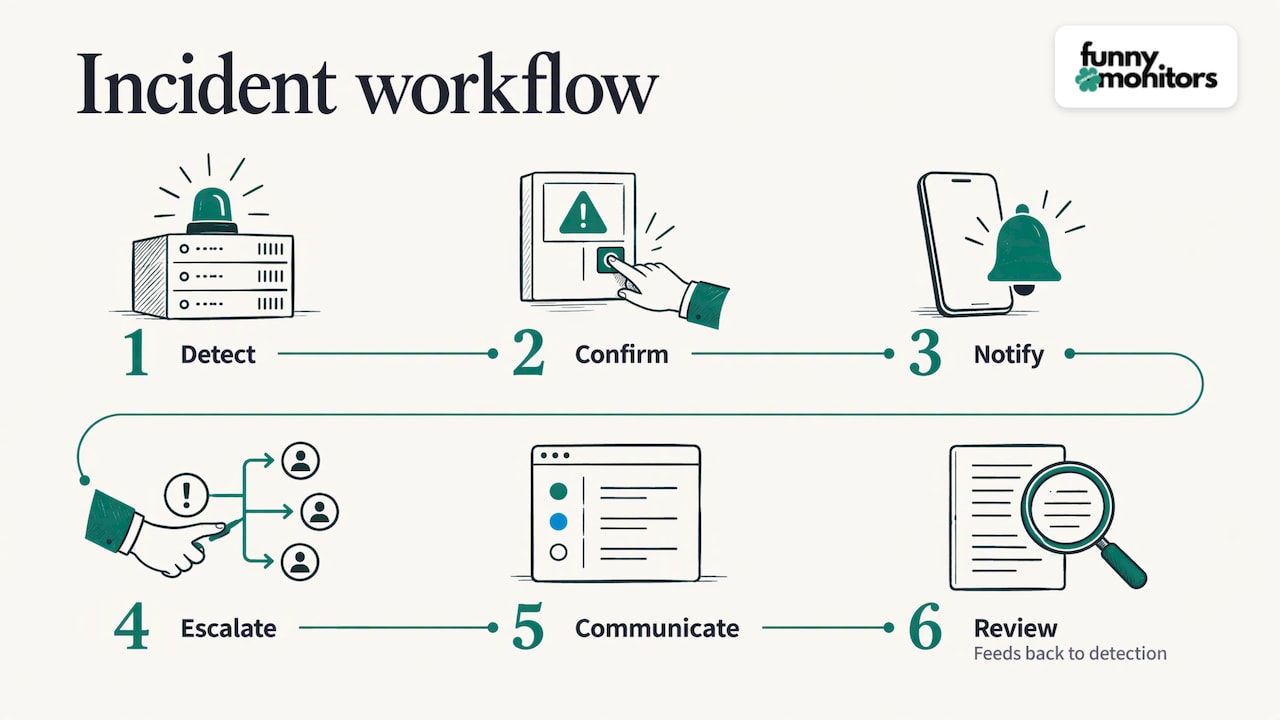
1. Detect
Checks run on a schedule. The shorter the interval, the sooner you know, so look at how often each monitor is polled. Cover more than the home page: the login, the checkout, the API endpoint your mobile app depends on, plus the less glamorous failures such as expiring SSL certificates and domain renewals.
2. Confirm
False alarms destroy trust in alerts faster than anything else. Confirming from more than one location filters out local network trouble and tells you whether the problem is regional.
3. Notify
Match the channel to the urgency. A slow response time might go to email or team chat. A full outage should be an SMS or a voice call, because those are hard to sleep through.
4. Escalate
Decide in advance who is next if the first person does not respond. For a freelancer that may be a client contact or a colleague. For a team, it is a rota. Escalation is the stage most often skipped, and the one that matters when someone’s phone is on silent.
5. Communicate
Customers forgive downtime far more readily than silence. A public or private status page, updated as the incident moves, answers the question before it lands in your inbox. Interactive status pages and status page announcements cover this for the client-facing side.
6. Review
After recovery, look at what happened: how long detection took, how long the fix took, and whether an alert could have come sooner or been quieter. OpenCensus’s incident guide ends its workflow the same way, with a step to assess and refine what you measure after recovery.
What to automate and what to keep human
The general direction from Google’s SRE guidance is to automate common tasks, impact analysis and suggested mitigations so the person on call can concentrate on solving the problem. Detection and notification are the safest things to hand over completely. They are repeatable, they do not change your systems, and a mistake costs a spurious message at worst.
Automated fixes need more care. An academic study of 156 high-severity incidents on a large AI serving platform, published for the AIOPS 2026 workshop, found that 74% were detected automatically, yet most were still mitigated by hand, with time to mitigate reaching around 49 hours in one month. Where one automated mitigation was deployed, it cut timeout-related errors by 99.6%. The lesson for a smaller team is to automate the narrow, well-understood recovery step first and leave open-ended diagnosis to a person.
A sensible split looks like this:
| Task | Automate? | Why |
|---|---|---|
| Running checks and confirming a failure | Fully | Repetitive, no side effects |
| Alerting and escalation | Fully | Speed matters, rules are simple |
| Status page updates for known failures | Mostly | Customers need fast, consistent news |
| Maintenance windows | Fully | Stops planned work triggering alerts |
| Restarting a service that has a known fault | Carefully | Only with a tested, narrow rule |
| Rolling back a release, changing data, spending money | Human approval | Wrong action can make things worse |
Fewer, better alerts
An alert that nobody acts on is worse than none. OpenCensus gives a clear example: if you tolerate 0.1% errors, 99.9% of requests must succeed, and a breach of that target should page a person. Alerts that do not breach it can be recorded without paging anyone. It also notes that a simple success-rate measure misses requests that never arrive because of a network problem, or that take so long users give up. That is why response-time checks and outside-in monitoring matter alongside error counts.
The same idea is behind priority levels. You will see incidents labelled P1 to P4, where P1 is a full outage affecting everyone and P4 is a minor issue that can wait for working hours. A research report by EMA and ServiceNow found that 42% of respondents have four to six established priority levels, each with set response and resolution times. For a small team, three levels are enough if each has a rule attached:
- Urgent: the site or API is down or checkout is failing. Voice call or SMS, escalate after a few minutes.
- High: degraded performance or an expiring certificate. SMS or chat, same-day fix.
- Low: anything informational. Email, handled in normal hours.
The same report observes that the organisations with the most actionable alerts also had mature automation, and that automation helps most when it makes the alerts that do reach people real and supported by guidance, not merely fewer.
Measuring whether it works: MTTA and MTTR
Two numbers tell you most of what you need.
- MTTA (mean time to acknowledge): the average time between an alert firing and a person confirming they have seen it.
- MTTR (mean time to resolve, sometimes recover): the average time from the start of an incident until service is restored.
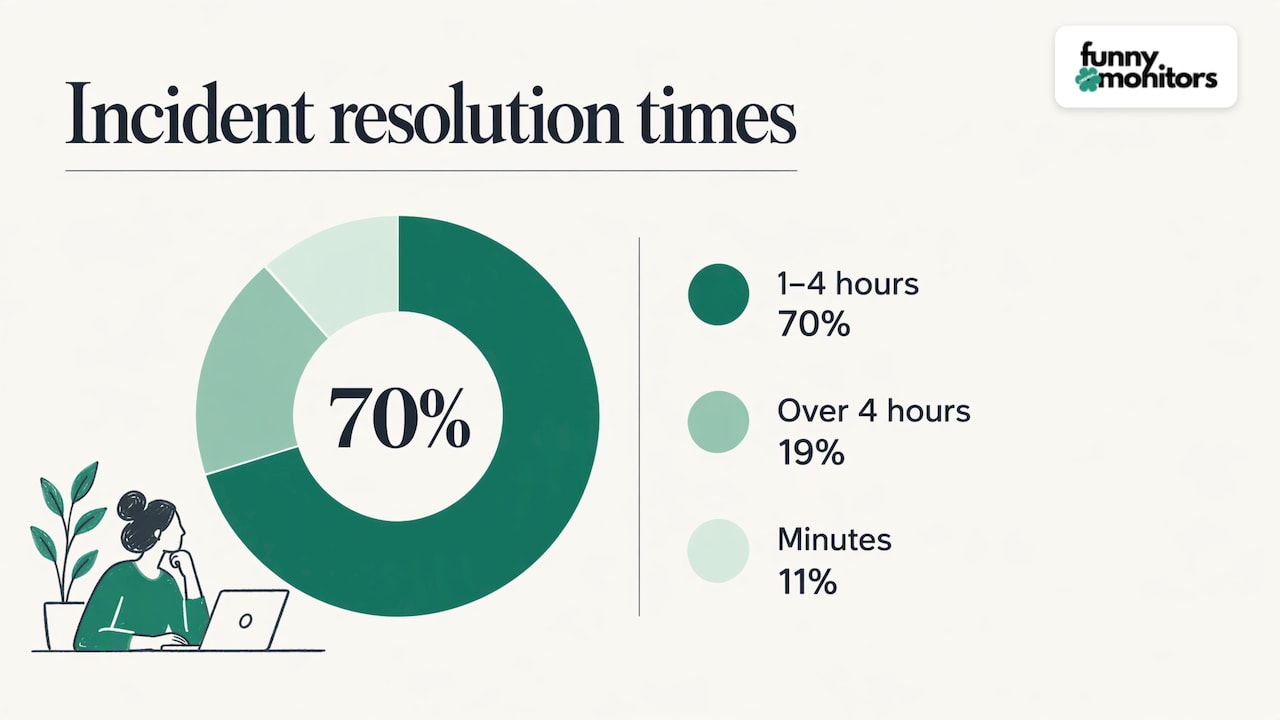
The EMA and ServiceNow report found that 70% of organisations take one to four hours to resolve an incident once it is logged, 19% take longer than four hours and 11% manage it in minutes. It also lists reduction in MTTR as the top measure organisations use to judge their automation investment, followed by fewer events and incidents and less downtime.
Automation can move these figures meaningfully. A longitudinal study of 13 cloud-native teams over 18 months, published in the IJCT journal, found that an AI-driven predictive framework cut mean time to detect by 64% (median 24.6 down to 8.9 minutes) and actionable alert volume by 76% compared with threshold-based monitoring. Those are results from advanced setups, but the direction is the point: detection and alert quality are where the first gains are.
For your own baseline, note the time an incident started, the time the alert arrived and the time it was fixed. A month of those records is enough to see where minutes are being lost.
Choosing and setting up a system
The EMA and ServiceNow report names the biggest barriers to adopting incident automation: data accuracy and accessibility, and difficulty integrating with other tools. Small teams can sidestep both by choosing carefully rather than buying the biggest platform.
Features worth having
- Several check types. Website, API, ping, port, TCP, SSL and domain monitoring, so one tool covers the whole stack.
- Multi-location checks. For confirmation and for spotting regional faults.
- Several alert channels. Email, SMS, voice and team integrations, so urgency can drive the channel.
- Escalation and maintenance windows. To reach a second person and to silence planned work.
- An API and webhooks. To connect incidents to your ticketing, chat or deployment tools. The IJCT study found the biggest detection gains (79%) for incidents linked to deployments, because a release gives an immediate cause to anchor on. Being able to trigger or pause checks around releases pays off for that reason.
- Status pages. Public or private, on your own domain if you wish.
- Transparent pricing. Seats and SMS credits should not arrive as a surprise on the invoice.
A setup order that works
- List what customers cannot live without: home page, login, checkout, main API endpoints.
- Add a monitor for each, and add SSL and domain monitors so expiry never becomes an incident.
- Choose alert channels and escalation order per priority level.
- Connect your chat or ticketing tool through the integrations or webhooks.
- Create a status page and decide who can post to it.
- Set maintenance windows for planned releases.
- After the first real incident, review MTTA and MTTR and adjust.
The IJCT authors also found that automation gains depend on maturity: teams with larger catalogues of automated actions and higher confidence in autonomous remediation saw a 68% reduction in time to mitigate, against 49% for more cautious teams. Start with detection and alerting, then add automated actions one at a time as you trust them.
How FunnyMonitors fits
FunnyMonitors provides subscription uptime monitoring for websites, APIs, ping, port, TCP, domains and SSL, with real-time incident detection and analytics, automated incident management, maintenance windows, and alerts by email, SMS, voice and team integrations. An API and webhooks let you wire incidents into the tools you already use, and customisable public or private status pages keep customers informed. Status pages, integrations and the API are included in the monitoring service, and polling data shows how often your monitors are checked. For teams running deployments, our DevOps page shows how this fits a release workflow.

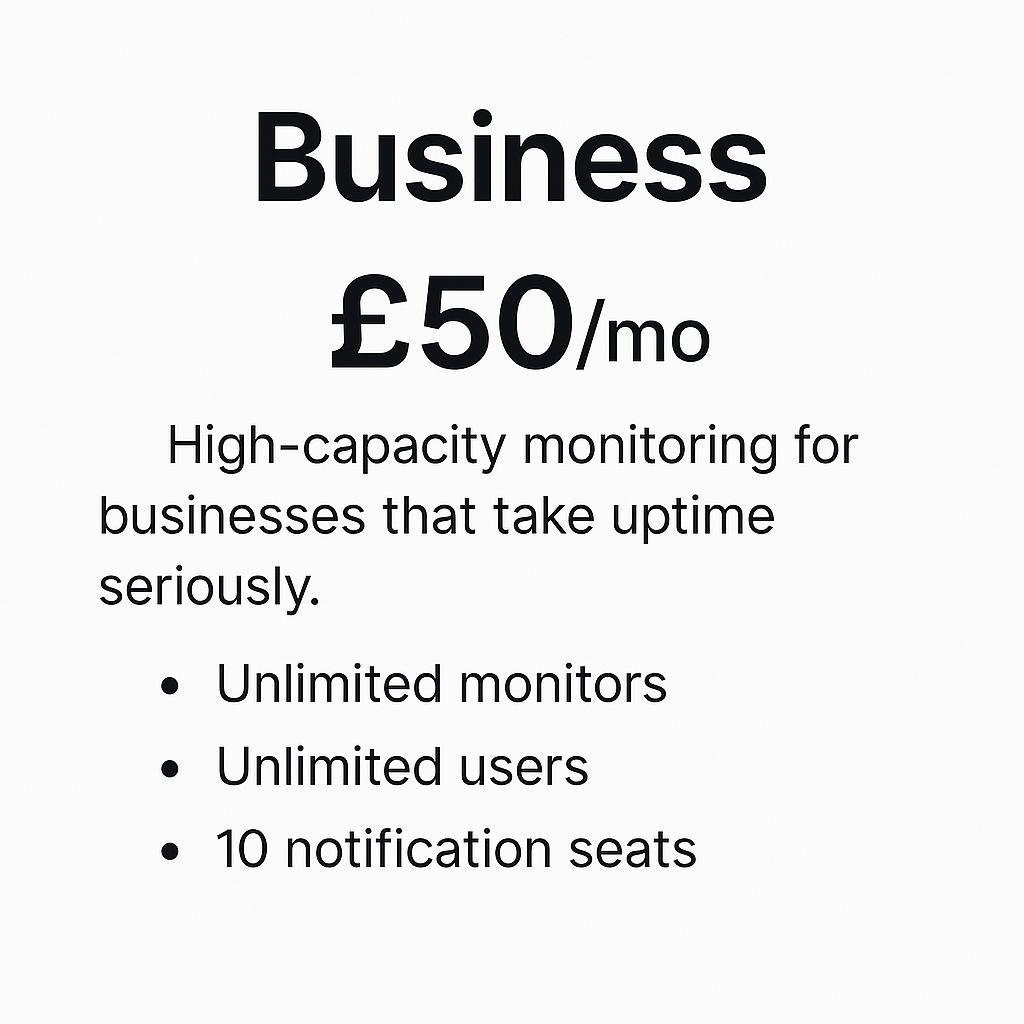
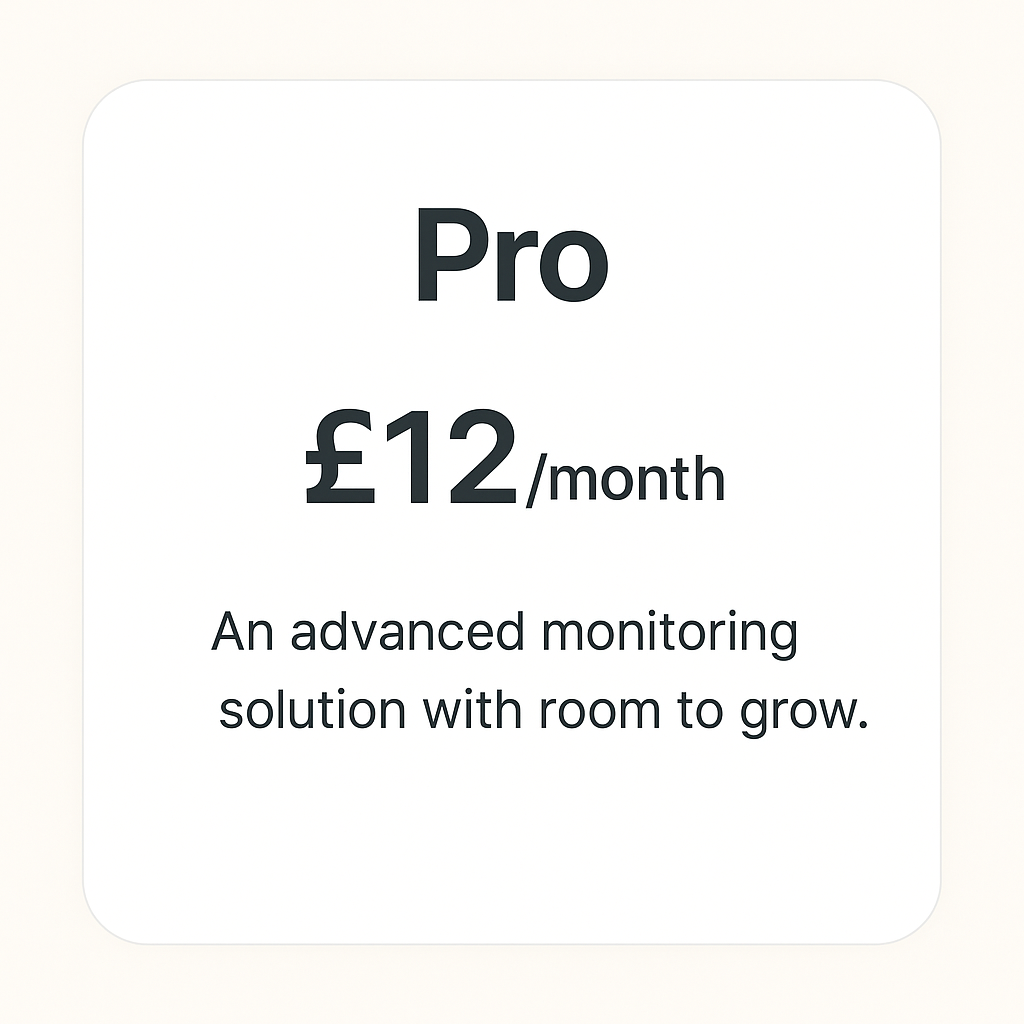
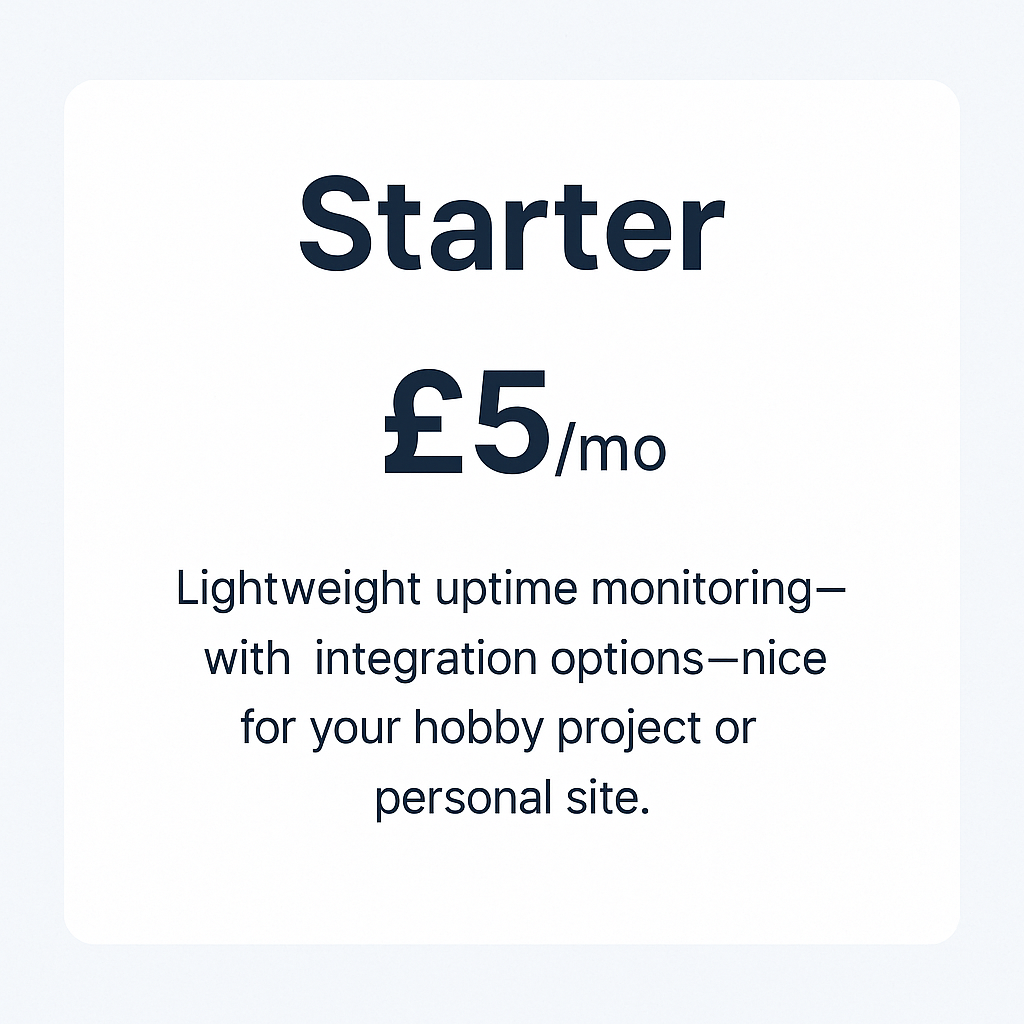
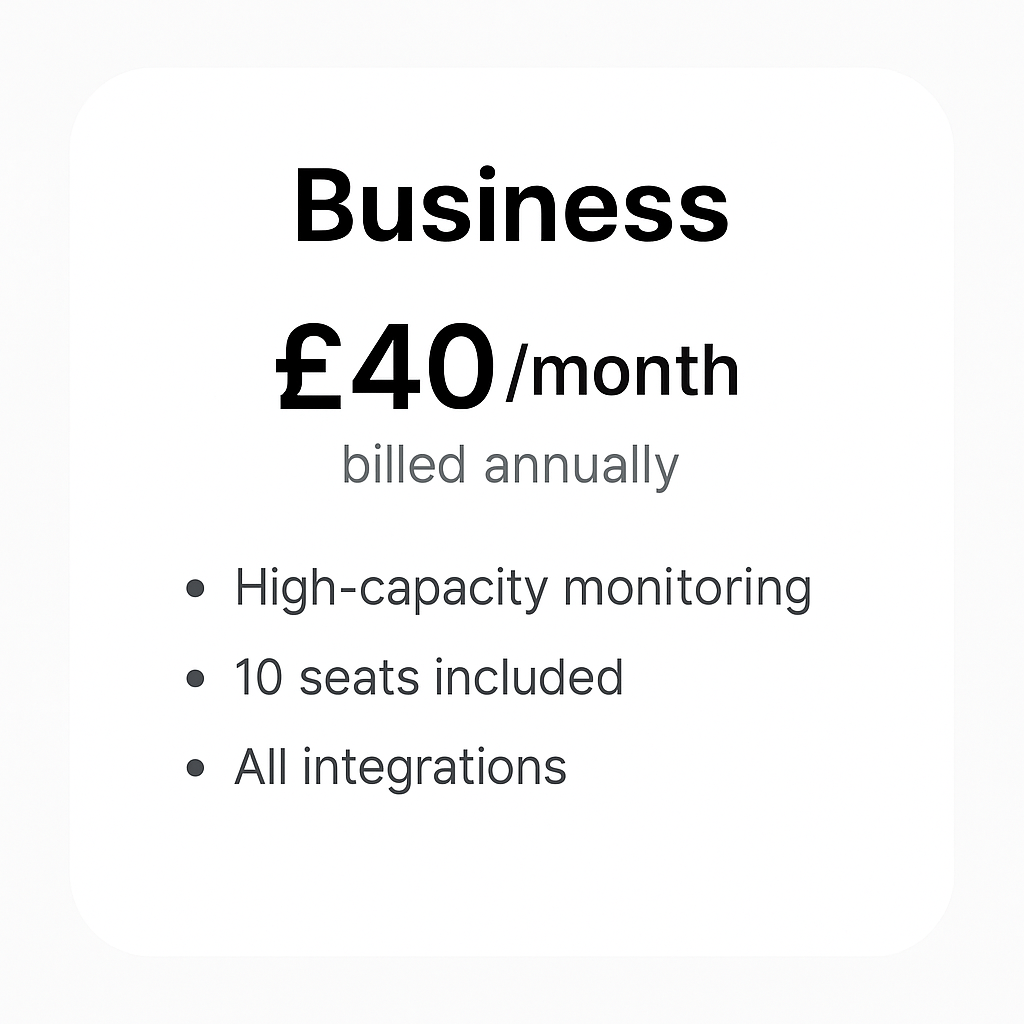
Plans are published on the pricing page: Starter is £5.00 per month (£48.00 per year), Pro is £15.00 per month (£144.00 per year) and Business is £50.00 per month (£480.00 per year). An Enterprise plan is also available, and additional notification seats can be added. Freelancers and small businesses usually begin with a handful of monitors on Starter.
FAQ
What is the five-step incident management process?
The usual steps are detect, respond, resolve, communicate and learn. Automation mainly shortens the first two, by finding the problem sooner and reaching the right person, and it handles most of the communication through alerts and status pages. The learning step depends on the records your monitoring keeps.
What are P1, P2, P3 and P4 incidents?
They are severity levels. P1 is a critical failure such as a full outage, and P4 is a minor issue with little user impact. Each level should have an agreed response time and alert channel. Small teams can manage with three levels if each has a clear rule.
What do MTTA and MTTR mean?
MTTA is the average time for someone to acknowledge an alert. MTTR is the average time to restore service after an incident starts. Together they show how quickly you notice and how quickly you fix, and they are the most common way to judge whether automation is paying off.
Can a small business automate incident management without a large team?
Yes. Start with external monitoring, multi-location confirmation, alerts by SMS or voice, an escalation order and a status page. These need no on-call platform of your own and cover the stages where the most time is usually lost.
Sources
- Google SRE: incident management guide
- OpenCensus: incident guide
- AWS Cloud Operations Blog: Hapag-Lloyd incident automation
- An Empirical Study of Automation Gaps in LLM Serving Systems
- EMA and ServiceNow: Real-world incident response, management, and prevention
- Applying AIOps for Predictive Incident Management in DevOps-Driven Cloud Infrastructure